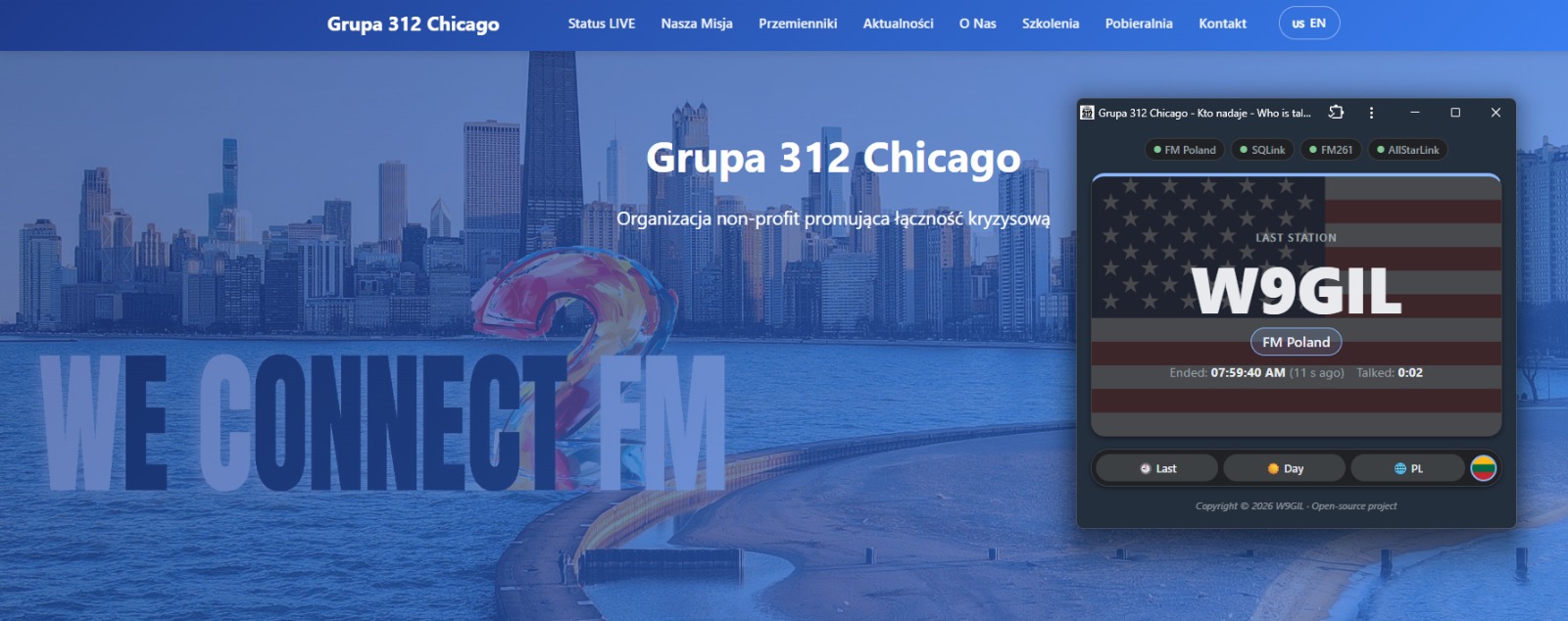
For the past few weeks, a small application has been available on our website that answers one of the most frequently asked questions on the radio: Who's talking on 312? The idea came from a very simple need. Our group can be monitored through several networks simultaneously, and until now, finding out who was transmitting required opening several different dashboards. I decided to bring all that information together in one place.
That's how the Mini Dashboard was born – a single screen that collects activity data from FM Poland, SQLink, FM261, and our AllStarLink node. It works on mobile phones, desktop browsers, and can also be installed as a standalone app-like application. You can find it under the blue "Mini Dashboard" button on our repeater status page.
Whenever someone starts transmitting, their callsign appears in large letters in the center of the screen, along with a timer showing how long the transmission has been active. Below that, you'll find the operator's name retrieved from QRZ, the network they are connecting through, and their location. The latter information comes from the SVXLink hotspot configuration. Users can customize what is displayed there. For example, someone using a hotspot in their car can enter "Mobile" instead of a city name. The dashboard will then display the operator's name followed by "Mobile" rather than a geographic location.
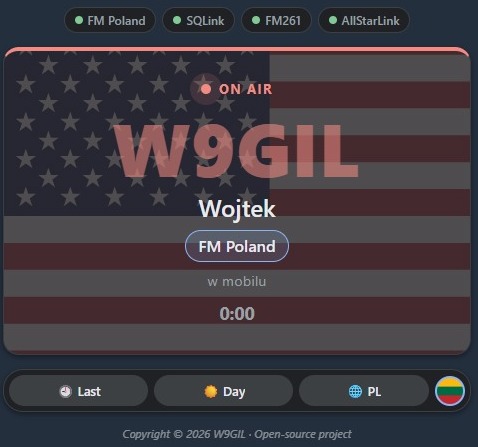
The application also recognizes transmissions originating from repeaters and public hotspots. In these cases, instead of displaying the device owner's name, it shows something like "Repeater · Arlington Heights." This is important because the person transmitting through a repeater is not necessarily its owner. Bridges connecting the various networks are automatically hidden so they don't take up screen space or obscure the actual stations communicating on the group.
What happens when the group goes quiet? The last heard station remains on the screen. You can see its callsign, network, transmission end time, how long ago the transmission ended, and the duration of the transmission itself. After one hour of inactivity, the screen automatically returns to the "Silence" message, so there is no risk of confusing old information with an active transmission.
The "Last Heard" button opens a list of the ten most recently heard stations. Each station appears only once, with the list reflecting its latest activity. More importantly, this is a shared list available to all users. It is maintained by a small program running continuously on our server. This means that when you open the application, you can immediately see the group's activity history, even if your phone has been sitting in your pocket for the past several hours.
I based the application's appearance on the color schemes of Google Maps and Android Auto, knowing that many people listen to our group while driving. Both light and dark modes are available, and the entire interface can be switched to English. Colored indicators at the top of the screen show which networks currently have active connections.
I also added a little something for those who enjoy the geographical side of amateur radio. A round button featuring a flag allows you to display the country flag associated with the transmitting station. The flag appears subtly in the background of the station's information panel and is automatically identified based on the callsign prefix. If you like this little extra feature, credit goes to Marian, G0MMM!
The Mini Dashboard can also be installed directly on your phone. Once installed, it gets its own icon featuring the Group 312 logo and opens in full-screen mode, without the usual browser controls.
On Android, simply use the "Install" option in the application's footer. On an iPhone, select "Share", followed by "Add to Home Screen." On a desktop computer, the dashboard can be opened in its own small window, with its size automatically adjusting to the displayed content.
I encourage everyone to give the Mini Dashboard a try, install it on your phone, and keep it running during our regular group activity. Any feedback, suggestions, or ideas for additional features are always welcome.
73 de Group 312